Thursday, October 26, 2017

SECOND BATCH ALLOCATED CANDIDATES 2017/2018

Here is the list of candidates who has been allocated with Loan second batch. Second batch has beeen released on Wednesday 25.10.2017 in HESLB site.It is about 11,481 of candidates who has been allocated.  To see the names DOWNLOAD HERE.

Tuesday, October 24, 2017

DOWNLOAD KOREAN SERIES AND MOVIES USING FIREFOX AND IDM

Hello guys, if you remember i already old you how you can download Korean series and movies in your smart phone by using APP called Dramanian which is found in their site. Today i have something interested which is that you can start download Korean series and movies plus Thailand and Japanese series and movies in your Computer by using Mozilla Firefox and Internet Download Manager (IDM).

First of all what you need is install Mozilla firefox in your computer then install IDM . After that open your Mozilla browser, IDM extension will detect and it will ask to enable and restart your Mozilla .You need to make Mozilla as default browser by going to Control Panel

  •  Go to the search box on your top right side of your desktop and search "Default" it will show the results then click on set your default programs it will load all the program and list down


  • Under the list of programs click Firefox and go to set this program as default then press Ok


 Then after restart Mozilla go to this link  HERE here you will have many series and movies you can search what series you want click the results name of the movie/series you want and it will direct you on the list of all episodes then you can pass through all episodes which every episodes has 1-3 or 1-5 parts so you can start play each part under a Playlist 2  .Follow the description bellow

  • Go to search box or popular series as shown in figure one search and click to the respective result

Fg1

  • After click the name of the searched series scroll down you will see the list of episodes then click on the episode you want to download 


Fg2


  • It will open and you will see three playlist with all parts so scroll down to playlist 2 then click part 1 it will load then click Close&continue 

Fg3
  • After close & continue the download gadget will appear at top right corner of the played video so click download
Fg 4

  • Then start download
Fg5
You will need to download all parts 1-4 with the same procedures then one episode to another follow the same procedures. I hope you will enjoy and thanks for visiting my Blogger.
Don't forget to share to your friends.


Sunday, October 22, 2017

REQUIREMENTS TO INSTALL KALI LINUX ALONG WINDOW 10

Hello guys, today we are going to discuss requirements to install Kali Linux along Window 10. Kali
Linux is one among of Linux as operating system which can be used in computer. Other Linux  similar to Kali is such as backtrack 5.


Using Linux is very important due to some basic features of Linux such as Linux is free from virus it does not affected by virus also it is non commercial it does not require payment to buy its source or its system programs.There are basic specification requirement for installation of Kali Linux which are:

  • A minimum hard disk driver space 20 GB
  • RAM at least 1 GB for i386 and amd 64 Kali linux
  • CD-Rom driver or USB port for boot 
Apart from the above listed also for our case we need these:
  • Laptop or Desktop 
  • Installed Window 10 operating system you must install window firstly, make sure window is already installed in your computer.
  • Download Kali Linux DOWNLOAD KALI LINUX
  • Make a boo-table USB driver Linux USB live/ dvd with burned Kali Linux
  • Create 80 GB up to 100 GB hard disk free space and do not allocate it . It must be un allocated free space just leave it as free unallocated .
So in order to install  Kali Linux along window 10 these are all we need before the process. I hope you enjoy thanks for visiting my blogger see you next time. And next article we will discuss in details how to start install Kali Linux along Window 10.

Friday, October 20, 2017

HOW TO KNOW CONNECTED WI-FI PASSWORD IN YOUR COMPUTER USING CMD

Hello guys today i have something little and great to discuss. Its all about on how you can see the hidden wi-fi password which you was connected in your PC without being aware of the password used. We will using CMD (command prompt) step by step

  1. Go to the search box and write cmd then over cmd right click and run as administrator
  2. After run it you must type the following code
  • netsh 
  • quit
  • netsh wlan show profiles'


It will show all connected wi-fi network in your computer.
  • netsh wlan show profiles WI-FI name key clear 

For example netsh wlan show profile VFD key=clear
It will show password security type and its password clearly.
NOTE:This is not for the case of hacking/cracking password.
I hope you enjoy see you and thanks for visiting my blog.

Wednesday, October 18, 2017

PDF LOAN FIRST BATCH 2017/2018 RELEASED NOW DOWNLOAD

Hi there, here is PDF document for the candidates who have allocated with loan first batch you can download in link DOWNLOAD HERE .Congratulations for those who have been allocated with loan in first batch.

For those who have not allocated with first batch i beg you all be patient have faith,hope in God everything is going to be nice to since there other batch will be released latter . 

LOAN ALLOCATION FIRST BATCH 2017/2018

Hello dear visitors and candidates who were applied loan in HESLB  High Education Student's Loans Board of Tanzania, HESLB has release the names of allocated students year of study 2017/2018 on Wednesday 18/10/2017 . The Executive Director  Abdul-Razaq Badru  has provide the information to public about 10196 students have been allocated with loan on first batch out of 30000 students.

 He has said that other candidates who were applied loan must be patient while the process of admission of students in different Universities completed so other Batch/Batches will be released after accomplish the admission of students.  For more information please visit HESLB . To see you loan status if you have been allocated with loan please click LOAN ALLOCATION STATUS you will provide form four index number example:S1122.2017.2014
Or please login as registered student then click loan allocation 2017/2018 on your left hand side of the sub menu under this site LOG IN HESLB as shown bellow
I hope this information will help you. Wish you all the Best and Good lucky.

THE BEST COMPUTER FOR YOUR CHOICE

Hello! Guys you might ask your self which computer may suit you? ooohh! that's a good question but only if you know what you want with that computer maybe 
  1. what are you going to do with that computer?
  2. What is hobbies or interest in computer?
These two simple question can help you to pick or choose the best computer for your needs. Since the best computer is the one that suit you with all of your needs. Lets look on computer specifications. Computer specifications is the biggest issue that is almost determine the capability/power of your computer. The demands of any buyer / user of computer can consider different things that may seen like are little but in fact they are meaningful in the process of pick a PC of your choice.
We can categorize this PC accordingly to users. 

  • For those Gamer/ multimedia you may need a computer with this specifications
  1. 64 bit operating system type
  2. Support window 7 and above up to window 10
  3. Total graphic memory (GRAPHIC MEMORY AT LEAST 1 GB AND ABOVE/ DEDICATED AMD GRAPHIC MEMORY/ NVIDIA MEMORY 2 GB and above for multi-media)
  4. Processor speed at least 1.9 Ghz and above
  5. Random Access Memory (RAM) at least 4 GB and above with good speed.
  6. High storage capacity HARD DISK DRIVER SPACE 500 GB and above
  7. Monitor size/Screen resolution with High definition HD screen. 
All these specifications are just pre-specifications to be considered so any computer with specification details more than listed above may be better for your choice reminding you i just said "at least" so you can buy a computer with high specifications. To the group of users there are many importance of considering those specifications listed above such as high speed of accessing your PC due to high RAM, short time in video editing production (render) due to RAM,processor speed and graphic memory, high quality display and easy to play the Biggest/3D powerful games for the gamer and easy way to store data due to hard disk drive capacity.
  • For normal users you may need any computer with these specifications
  1. 32/64 bit operating system type
  2. Support window 7 and above up to window 10 others are using window XP which is less secured.
  3. RAM 512 MB and above
  4. Hard disk storage 100GB/250GB and above
I hope guys we are now able to buy the computer for our life/dreams and interest.. See you and enjoy using your PC.

Thursday, October 5, 2017

SELECTED CANDIDATES FOR MZUMBE UNIVERSITY AND UNIVERSITY OF IRINGA

Other universities and colleges are continue on release the admitted candidates on various different category certificates,diploma degree programs.


Mzumbe University has release the names of candidates with multiple selections on other Universities, to see the list click LIST OF CANDIDATES.
Also for University of Iringa has release the names of candidates with information problems click HERE
Those who have been selected to join degree programs  click HERE. And for those who are admitted to join Postgraduate degree click HERE.

Sunday, August 13, 2017

HOW TO MAKE YOUR COMPUTER FAST

Guys some of us faced the problem of computer to run so slow while it has got a big ram memory. This issue can be fixed by doing different ways. This slowness can be during start-up your computer or running on your computer and some times it can be due to storage running out.

  1. Find the the Folder Temp  by doing the following  press window button + R or go to search box and type Run., in run box type %temp% then press ok it will show many kinds of stuff in the file. what you have to do is just select/highlights all files and folders in this Temp folder and Delete them. This will help your to free some space on your drive.                                               
    fg 1
  2. Removing malware on your computer. This malware is kind of virus which can less down your computer speed and some time steal your information/data. This is mainly caused by accesing of internet on your computer in unsecured sites also by installing unsecured and unknown program resources on your computer. You can remove these malware by using the Program known as Malwarebytes free program so download this program by searching on google with this keyword Malwarebyte and install it. Then boot your computer in safe mode with network cellular or Wi-fi. You can boot in safe mode by doing this way go to the search box  and type run select and type msconfig then press ok .Then your computer will ask you to restart it now                                                                                                                          
    fg 2
    In safe mode with network start running the program it will scan and detects the malware after finnish scan it will show the results and you will needed to quarantine the founded malware. Then the computer will restart.
  3. By  Defrag your PC just download the free program from google search 
  4. By Check disk go to your drive C then right click then go to properties follow the instruction shown bellow                                                                                                                                   
    fg 3 a


Friday, August 11, 2017

WINDOW 10 HIDDEN WINDOW TRICKS YOU NEED TO KNOW

Window 10 has secret tips that you would not aware on it already and if Yes you know it maybe not actually all tips. This tips help in simplify the easy access of your computer. This tips are found on last version of Window 10 that include the Second Generation which was released on June 2016. Not all window 10 has this secret tips. The following are the sum of   Window 10 secret tips

1.Secret Desktop Button.
In case you are on other task running on background such as you have open several task and you need to go to desktop without affecting the running application or on going activities and you want to reach the desktop easily you can just reach the desktop easily by pressing this button found on Taskbar on the down right corner of the screen as shown bellow

2.Rotate your Screen using keyboard shortcuts
Here you can use keyboard shortcuts button plus arrows which are Ctrl + Alt + Arrow keys such as left/Right/Down/Up arrow. These arrows it specific when you press these shortcuts plus this arrow as        Ctrl + Alt + Up arrow/ Down Arrow/Left arrow/right arrow.
Other way you can right-click on your desktop background and find Graphic Option then go screen rotation.

3.. Slide down to shut down your PC
Guys you can slide your Desktop background and be able shut down your PC without going on the Power option what you need is just Go to the desktop background and right click then go to New then select Shortcut then Paste the following words %windir%\System32\SlideToShutDown.exe Then press Next button and follow the instruction as shown bellow

4. Access the Computer on important details
You can access your PC in easy way on the following issue or details such as Administrator Tools, Backup and Restore, Auto play, BitLocker Drive Encryption, Color Management, Device and Printers, Display and other many settings. All you is “GodMode” to access all this settings. Create a New folder the rename it by using this title GodMode.{ED7BA470-8E54-465E-825C-99712043E01C} then press enter your folder will change its appearance and look like Control panel icon

Guys i hope you will get interested on using this Window 10 new version.

Monday, August 7, 2017

DO NOT STOP HUSTLING

People they do not care about your hustler the only thing they appreciate is your success so keep in mind that no one cares about your problem you are on your own just fight for your Life..

Sunday, August 6, 2017

NO NEED TO FORMAT YOUR COMPUTER REALLY!

Hello guys am so happy to write this to you. Its all about window operating system which are window 8.1 and window 10. what is all about to discuss today is that awesome window feature which these two different window has. Window 8.1 and window 10 has got a feature that help you no need to format your computer or boot it on USB, Ethernet or on DVD or CD. In these window allows you to reinstall window without any need of boot window. What you need is just existed window on your PC where you can reinstall window by remove all apps and settings but keep your personal data on your Local partition with installed window or you can remove both apps,settings and your data.You can do this in case you have some software/programs not work properly due to some program damaged or some corrision of drivers. Lets start with some these steps
1.Go to search box and write down reset this PC as shown bellow
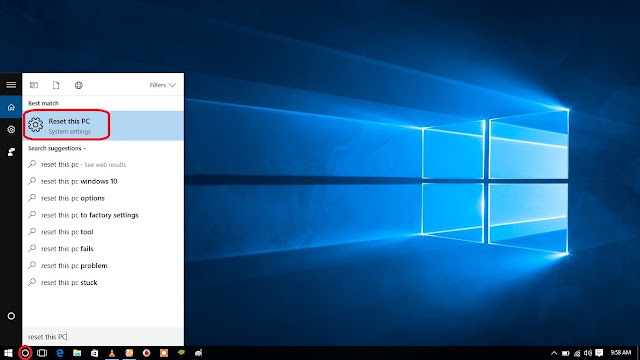
Figure 1
2.Click reset this PC then you will see the following
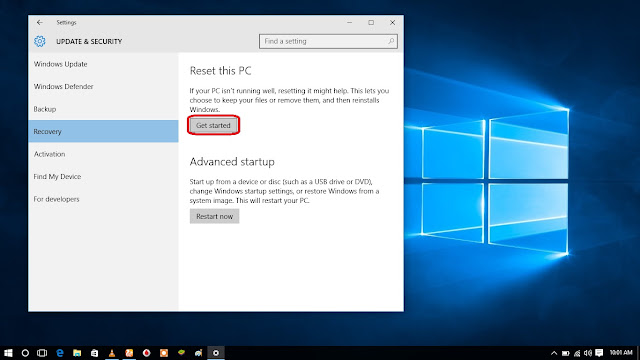
Figure 2
3.Click get started as shown on figure 2 and you go on the follows. You can choose which option you want to work on it either remove apps& settings but keep personal dat
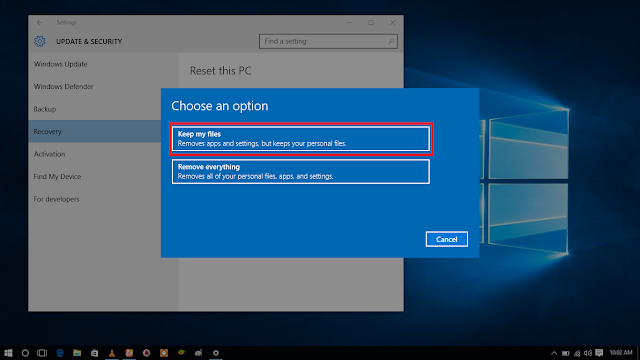
Figure 3A
Or to remove all apps, settings and personal data as shown
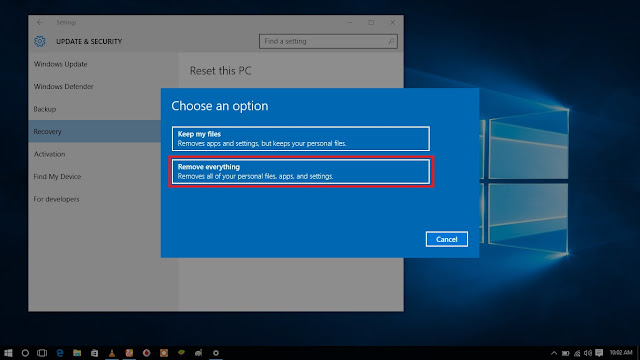
figure 3 B
After you click on either on of the two option your computer will give you a warning that your computer is going to be restarted and reinstall the window.All this steps is done when your PC is On.
After window reinstall completed your computer will restart and you will need to fill some basic personal information on your computer this include your User name & password. 
NOTE: Do not turn of your computer during this process and make sure you plug in your computer adapter to recharge your battery in case it is running out.
I hope you will enjoy and do it.